
Understand the robustness question
A stress test asks what changes when selected assumptions become less favourable. It does not make a strategy profitable or certify resistance to every future condition.
Start from an identifiable baseline backtest. The modified scenario is meaningful only when its starting data, strategy version and settings are clear.
Build a shock scenario
The offered intensities are shortcuts for preparing settings. Select one and review the active values. A selected option should remain identifiable when the pointer moves away.
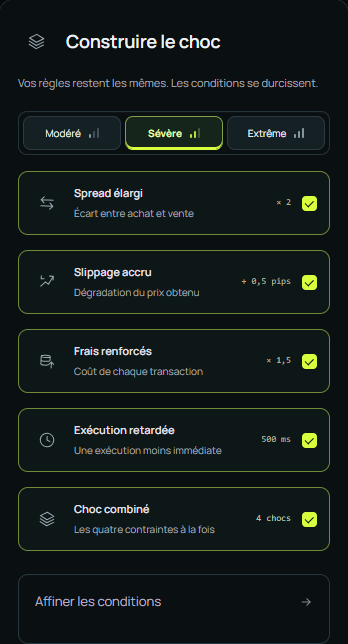
| Shock | Question studied | Useful reading |
|---|---|---|
| Wider spread | Does the outcome depend on a very small buy/sell gap? | Added cost relative to average gain |
| Higher slippage | Do less favourable prices change the signal’s value? | Outcome difference and exit sensitivity |
| Higher fees | Do transaction costs absorb much of the gain? | Net result after the scenario |
| Delayed execution | Does the signal depend on a rapid response? | Deterioration and affected operations |
| Combined shock | What happens under several constraints? | Overall outcome, then individual shocks |
Review values and units
Open the scenario settings to inspect multipliers, minimums, pips and candles where offered. Multiplying an initial zero differs from applying a non-zero minimum.
Start with an isolated shock to investigate a cause. A combined shock gives a broader view but makes attribution more difficult.
Compare against the baseline
Record before-and-after values. Read net result, drawdown and available operation count. Check that the operation finished: an absent result should not be interpreted as resistance to a shock.
Substantial deterioration can indicate dependence on specific costs or delays. You still need to decide whether those assumptions are justified for your intended use.
Explore variability
Variability simulations, when accessible, provide multiple trajectories based on observations and selected settings. They help examine dispersion and drawdown scenarios, rather than establish certain probabilities for the future.
Interpret a drawdown threshold
A threshold asks what share of simulated scenarios exceeds the chosen level in this exercise. The answer depends on the starting sample and simulation assumptions.
Study note:
Baseline: backtest version and period.
Scenario: modified costs or delays, with units.
Observation: difference in outcome and drawdown.
Limit: historical data and retained assumptions.
Next step: review relevant costs or another period.
Use a specific conclusion
“Sensitive to this spread scenario on this period” is more useful than “robust” or “bad” without context. Investigate variants addressing that sensitivity without changing all parameters at once.
If an option is unavailable, read its message and your plan information. An access limit does not describe strategy quality. See Account and credits when needed.